
mcSkinningBee can be used for permitted non-commercial work without purchasing a license. Commercial production requires a valid commercial license. The License menu provides access to purchase, activation, license information, and local deactivation.
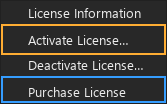
The blue outline marks Purchase License. The orange outline marks Activate License…, used after obtaining your purchased license file.
Screenshots in this section are isolated previews of the application's Qt UI. They contain no real customer license or activation data. Appearance may vary with the Maya version and theme.
Non-commercial and commercial use
The following summarizes the Software License Terms supplied with mcSkinningBee. Open Help → End-User License Agreement for the complete terms, which define the permitted uses and license conditions.
| Use | License requirement |
|---|---|
| Personal learning, experimentation, evaluation, and non-commercial personal projects | Permitted under the default non-commercial terms; no separate non-commercial license file is required. |
| Personal portfolios, demos, and showreels | Permitted when the work itself is not commercial production work. |
| Student work and classroom instruction | Permitted under the educational provisions, including paid teaching. This does not extend to commercial client production. |
| Internal studio testing | Permitted for evaluation isolated from actual production. |
| Paid employment, freelance client work, commercial productions, or work intended for commercial release | Requires an appropriate valid commercial license. |
Commercial license types
The terms describe the following arrangements. Check the current purchase offering or contact Bear of Spades for availability and deployment details.
| Type | Assignment and use |
|---|---|
| Nominative individual | Assigned to one identified person. That person may use it on different computers as reasonably necessary, while remaining its sole authorized user. |
| Studio-purchased nominative | Purchased by an organization and allocated to a named artist. Reassignment requires approval from Bear of Spades. |
| Studio floating | Where offered, permits authorized studio users up to the purchased simultaneous-seat count, subject to the deployment conditions supplied with the purchase. |
Commercial licenses have the duration and expiration date specified at purchase. Renewal is not automatic unless an auto-renewing option is explicitly offered and selected. After expiration, the default non-commercial permissions remain available, but commercial use requires renewed authorization.
Purchase a license
- Open License → Purchase License. This opens the Bear of Spades website in your browser.
- Follow the mcSkinningBee purchase information and the official checkout linked from the site. Check the license assignment, duration, and compatibility before completing the purchase.
- Obtain your purchased mcSkinningBee license file, with the extension
.mcsblicense, through the purchase process. - Keep a backup of that file, then follow Online and offline activation.
You can also start from the Bear of Spades website. Prices, available license offers, and purchase conditions belong to the current purchase page; the Maya dialog does not perform checkout.
Purchase file and activation file
| File | Purpose |
|---|---|
.mcsblicense |
Purchased license document. Select it with Browse… in the activation dialog. |
.mcsbactivation |
Activation certificate used by the offline import workflow. Import it with Import Activation File…. |
Installing the purchase file and activating commercial use are separate steps. Confirm the effective state in License → License Information after activation; the presence of a purchase file alone does not confirm that commercial use is active.
For licensing or purchase questions, contact support@bearofspades.com.